 KEMET
Sales Order
Track an agreed sale before final invoicing.
Steps
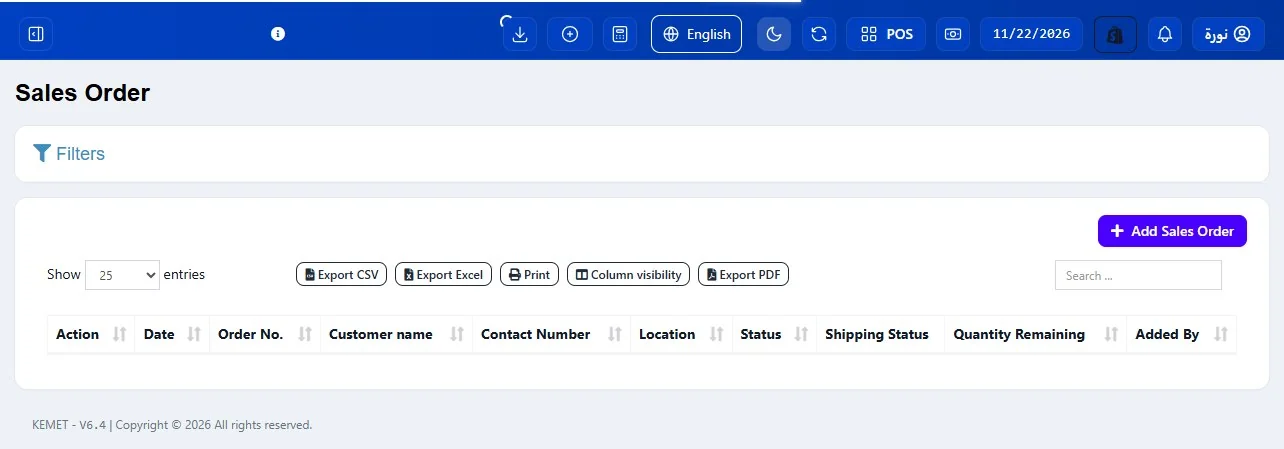
- Search by sales order number or customer.
- Open the lines and check remaining quantities.
- Use the authorized invoicing action when the sale takes place.
- Verify the new invoice and the stock for that branch.
Screen path in KEMET
/sales-orderField reference
- Sales order number
- The reference that identifies the order before final invoicing.
- Ordered and invoiced quantities
- Check how much was ordered and what was already converted to a sale.
- Location
- Confirms the order scope and the stock to review before invoicing.
Worked example
Find an order for four demo items and check whether two have already been invoiced. Review the remaining two before the next action.
The order’s lines explain the remaining amount and any linked invoice can be traced.
From ChatGPT or Claude
Help me with Sales Order. Ask which branch, reference, or dates you need, and show the relevant data before any changes.
Related connector tools
- Invoice a sales order
sell_convert_sales_order_to_invoice
Verify the result
- Confirm that the new invoice’s quantity does not duplicate a quantity already fulfilled.
Troubleshooting
The operation may have saved before the result appeared.
Search by invoice, customer and branch within the same period before saving again.
The screen or action is missing.
Ask the company administrator to check the add-on, menu visibility, role permissions, and branch scope.
Screen access depends on company settings, the role, and its allowed branches.