 KEMET
Add Sale
Record a direct sales invoice for the right branch and customer. Verify the exact variant and how much the customer paid.
Steps
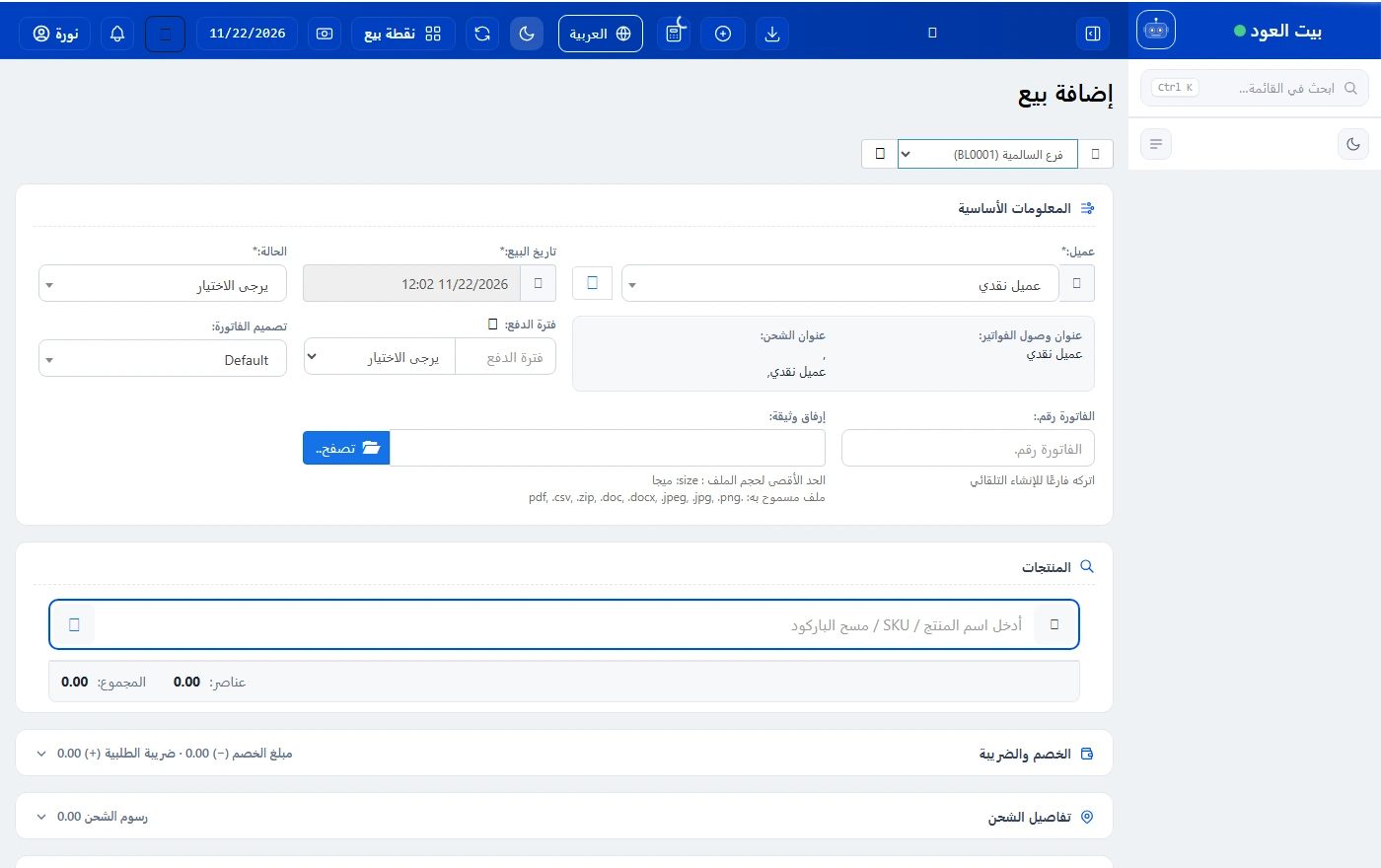
- Open Sell.
- Choose Add Sale.
- Select the branch above the form.
- Choose the Customer in Basic Information.
- Check Sale Date.
- Choose Final in Status for a completed sale.
- Search for the product by name, SKU or barcode.
- Select the exact variant.
- Set its Quantity.
- Check Unit Price.
- Review any discount and tax.
- Check Total Payable.
- In Add payment, enter the amount received.
- Choose the actual Payment Method if a payment was received.
- Choose Save, or Save and Print if available.
Screen path in KEMET
/sells/createField reference
- Branch
- The selector next to the map pin above the form. Choose it before adding items. Salmiya
- Customer
- Required. Select the exact contact for a credit sale.
- Sale Date
- Required. Check the date in the calendar.
- Pay Term
- Enter the agreed number of days or months when applicable. Company settings can make this required.
- Status
- Choose Final for a completed sale. Draft and Quotation are available for preparation.
- Invoice No.
- Leave blank to use the selected invoice scheme's numbering.
- Quantity
- Number of units of the selected variant. 2 bottles of 50 ml
- Unit Price
- Check the suggested selling price for the variant. KWD 12.000
- Discount Type / Discount Amount
- Check whether the discount is fixed or a percentage before entering the value.
- Amount
- In Add payment, enter the actual amount received. Use 0 for full credit.
- Total Payable
- Review the total after discounts, taxes and shipping where applicable.
Worked example
In the Oud House demo, Salmiya has eight 50 ml Rose Perfume bottles and Avenues has two. The customer already owes KWD 15.000. Record a final sale for two bottles at KWD 12.000 each from Salmiya, without a discount, tax or shipping.
| Payment | Paid | Due on invoice | Total customer balance |
|---|---|---|---|
| On account | KWD 0.000 | KWD 24.000 | KWD 39.000 |
| Part payment | KWD 10.000 | KWD 14.000 | KWD 29.000 |
| Paid in full | KWD 24.000 | KWD 0.000 | KWD 15.000 |
Finalizing the sale leaves six bottles at Salmiya and two at Avenues in each case. With full payment, the original KWD 15.000 remains due.
A final sale deducts the sold variant from the selected branch. The payment amount determines how much the customer owes. A draft or quotation does not finalize the stock or payment.
From ChatGPT or Claude
Prepare a final invoice for Ahmed Khaled at Salmiya. Two bottles of Rose Perfume 50 ml, code ROSE-50, KWD 12.000 each. Full credit, with nothing paid yet. Check the exact variant's stock in Salmiya and show the preview before saving.
- Match customer, branch and variant in KEMET.
- Check the stock for the variant at that branch.
- Review the branch, customer, variant, quantity and unit price. Expect KWD 24.000 total, 0.000 paid and 24.000 due.
- Ask for a corrected preview if anything differs.
- Approve the specific preview. Keep the invoice number after success and verify the invoice and stock.
The short sale tool prepares a final sale, with one full payment or full credit. It uses the stored variant price if no unit price is supplied. Choose a quotation or draft action for those documents. The Add Sale form has separate fields for partial payment, shipping and invoice discounts when enabled.
Verify the result
- Open All Sales and find the invoice number.
- Check the customer, branch, variant and quantity.
- Check the paid amount, remaining amount and Payment Status.
- Check the variant in the branch Stock Report.
- For a credit sale, check the customer's Ledger for the invoice date.
Troubleshooting
The item exists but there is insufficient stock.
Check the exact variant and branch. Confirm the actual goods movement before saving.
The customer only asked for a price.
Choose Add Quotation. Review it before issuing a final invoice.
The customer paid KWD 10 of KWD 24.
Enter KWD 10 with the actual payment method. Verify that KWD 14 remains due.
Add payment is missing.
Check the sale status and sell.payments permission. Ask authorized staff to record any actual payment.
The final total is off.
Check the variant, selling price group, discount type, tax and shipping.
Saving fails because of the credit limit.
Review the customer's balance with the person responsible for credit. Verify any actual payment before trying again.
The form or chat stopped while saving.
Search All Sales by customer, branch, date and total before trying again.
Enable direct sales and use a role with direct_sell.access. Add payment requires sell.payments in the form. The chat tool checks sell.create.
Training in the KEMET Academy after signing in /academy/native/sales