 KEMET
Add Product — Variable
Create one product with several sizes or colours, each with its own code, price and tracked quantity.
Steps
- Find any existing item by name and barcode in List Products.
- Open Products → Add Product.
- Set name and barcode type in Identity.
- Select the sale unit in Units & Classification.
- Set branches and stock tracking in Stock & Locations.
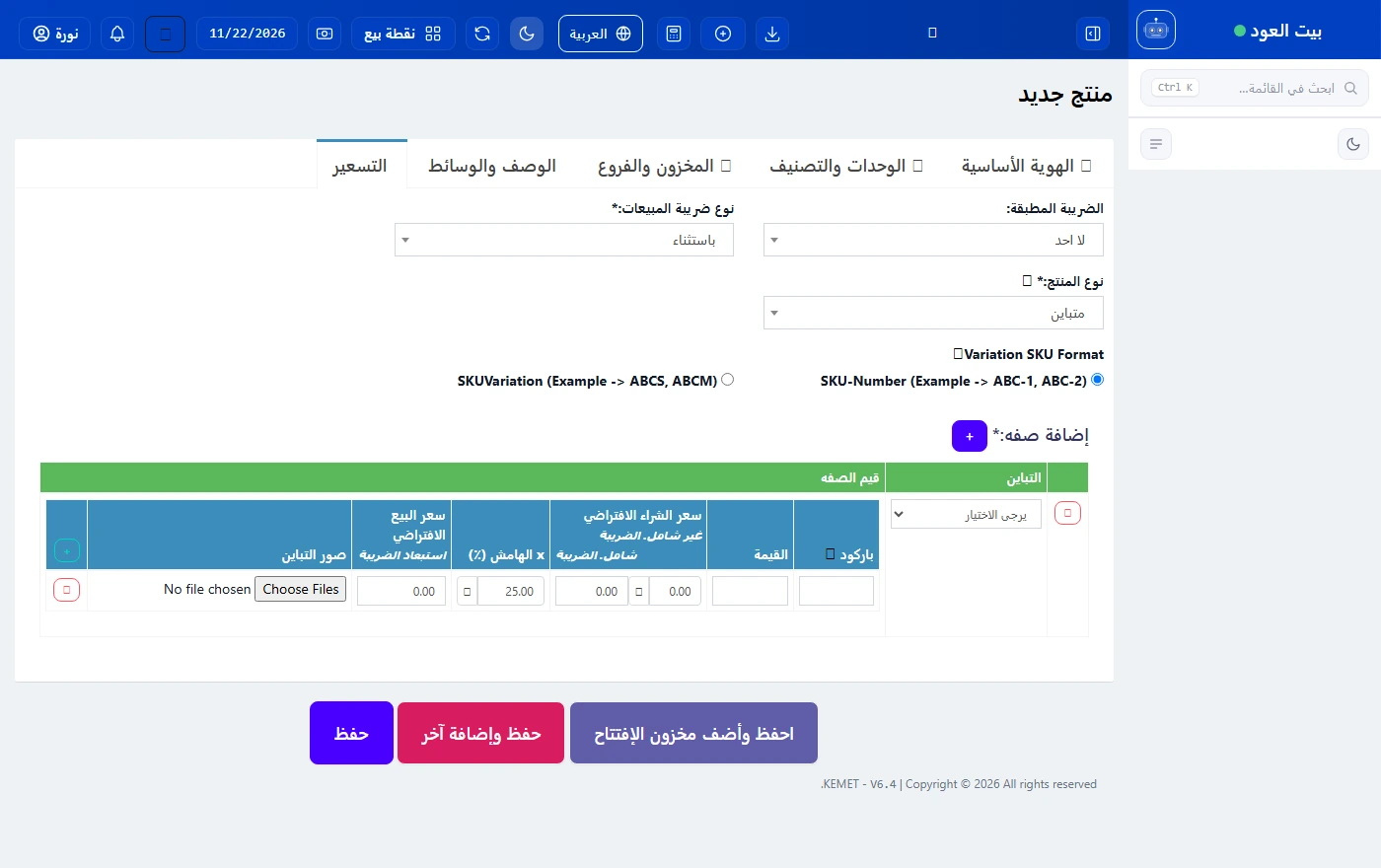
- Open Pricing.
- Set Product Type to Variable.
- Select the matching template under Variation.
- Select each option value for this item.
- Use + inside Variation Values to add a value row. + next to Add Variation adds another group.
- Enter each row's barcode.
- Enter each row's purchase and selling price when shown.
- Match all rows to the packages.
- Save or use Save & Add Opening Stock if required.
- Enter the opening amounts by size and branch.
- Save the reviewed opening values.
Screen path in KEMET
/products/createField reference
- Product Type
- Choose Variable to show the variation table.
- Variation
- Select a common attribute template, such as Size or Colour. Volume
- Variation Values / Value
- One row per option. 50 ml and 100 ml
- SKU / Variation SKU Format
- The main code identifies the card. Each row's code identifies its exact package. The format controls generation when a row SKU is blank. ML-050 and ML-100
- Default Purchase Price / Default Selling Price
- Enter each variation's amount when prices are shown. Check the correct tax columns.
- Variation Images
- Optional images for the matching option.
Worked example
One Night Musk card has 50 ml and 100 ml rows with separate codes and prices.
Illustrative opening inventory. Salmiya has prepackaged Night Musk.
- 50 ml · ML-050 · KWD 6.000 cost · KWD 12.000 sale · 8 opening units
- 100 ml · ML-100 · KWD 10.900 cost · KWD 20.000 sale · 4 opening units
- Avenues · Zero for both sizes
After entering opening stock, Salmiya shows eight and four. A final sale of two 50 ml units leaves six of that size and four of 100 ml if no other movements occur.
The card saves the options, prices and codes. Stock movements use the matching size and branch. For a variable product prepared in chat, use the opening stock form separately for per-size balances.
From ChatGPT or Claude
Prepare Night Musk, unit piece, variation Volume. 50 ml, ML-050, cost KWD 6.000, sale KWD 12.000. 100 ml, ML-100, cost KWD 10.900, sale KWD 20.000. Check the existing catalogue and show both rows before saving.
- Check for an existing product before preparing a new one.
- Ask to see each size, barcode and price in the preview. Request corrections as needed.
- Confirm the correct draft or cancel it.
- Review the saved sizes. Enter any opening quantities in the opening stock screen.
Verify the result
- Open the saved product and inspect both sizes.
- Search each barcode and match the price.
- Verify each opening balance by branch in Stock Report.
Troubleshooting
Two sizes have the same code.
Use their actual package barcodes or different internal SKUs.
Two prices match unexpectedly.
Review each row under Pricing.
A size is missing.
Add its value to the existing card.
The new size has zero stock.
Record opening stock or a received purchase for the exact size and branch.
The assistant finds several sizes or branches.
Specify the barcode, variation and branch before approving.
Training in the KEMET Academy after signing in /academy/native/products