 KEMET
Import Opening Stock
Enter stock on hand at the start of tracking, by branch and variation.
Steps
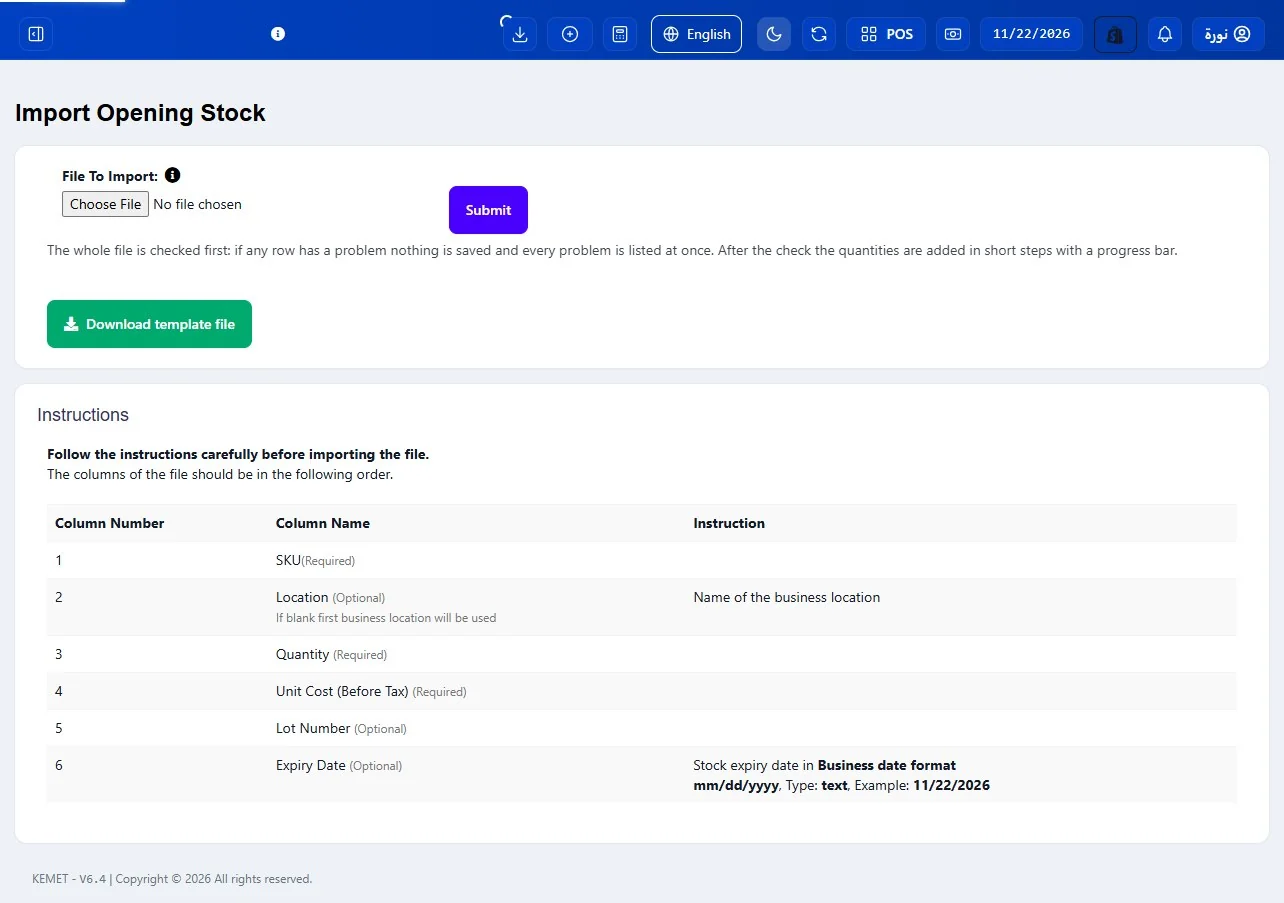
- Download the opening stock template.
- Match every SKU and option to the catalog.
- Fill the branch, quantity, and cost according to the template instructions.
- Upload after reconciling the file with the physical count.
- Verify each branch in the stock report.
Screen path in KEMET
/import-opening-stockField reference
- SKU
- Use the exact code of the tracked item or variation. Keep any leading zeros.
- Location
- Use the location column in the template to put each opening balance in the correct branch.
- Quantity and unit cost
- Enter the counted quantity and per-unit cost expected by the current template.
Worked example
The physical count finds eight 50 ml bottles in Salmiya at 3.250 KWD each. Give that option its own opening-stock row for Salmiya.
Verify the recorded opening quantity for the exact variation and branch before retrying any skipped rows.
Verify the result
- Read the added and skipped counts, then match Salmiya’s resulting stock to the worksheet.
Troubleshooting
The results include the wrong product or option.
Use the exact variant code and review filters and branch access before committing.
The screen or action is missing.
Ask the company administrator to check the add-on, menu visibility, role permissions, and branch scope.
Screen access depends on company settings, the role, and its allowed branches.