 KEMET
List Products
Find a product by name or barcode. Check the exact size, price and stock at a particular branch.
Steps
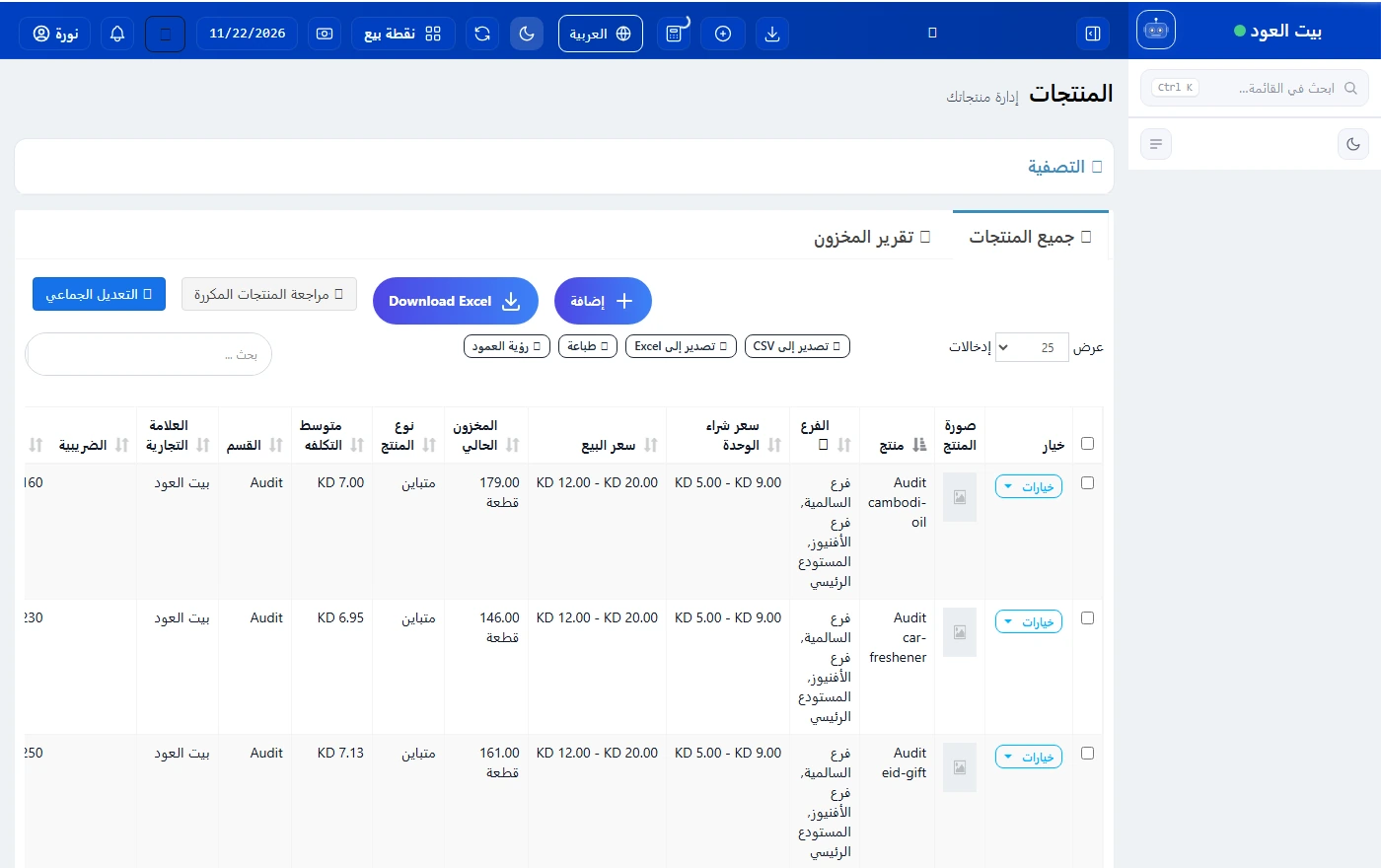
- Open Products → List Products.
- Select All Products.
- Type the name or barcode in Search.
- Apply a filter if the results are similar.
- Match the row to the package label.
- Select Actions → View.
- Match the variation's code and price.
- Open Stock Report.
- Select a Business Location.
- Read Current stock on the matching size row.
Screen path in KEMET
/productsField reference
- Search
- Enter part of the name, a product SKU or the option's SKU. Night Musk or ML-050
- Product Type
- Single means one item. Variable means there are sizes, colours or similar options.
- Business Location
- In All Products, this filters products assigned to the selected branch. Use Stock Report to check one size's branch quantity.
- Category / Unit / Brand
- Narrow similar results. Clear filters when unsure how the product was classified.
- Status / Not for selling
- The default list hides inactive and not-for-sale products. Use the relevant filter to find them.
Worked example
Use the Salmiya 50 ml row for a sale of Night Musk 50 ml in Salmiya.
Illustrative data. A customer asks for three Night Musk 50 ml bottles in Salmiya.
- Salmiya · 50 ml · ML-050 · 8 units
- Avenues · 50 ml · ML-050 · 2 units
- Salmiya · 100 ml · ML-100 · 4 units
Search ML-050 and match the size. Eight is the quantity of the selected size in Salmiya. Looking up the item leaves eight in stock.
Search, View and Stock Report read existing records. Saving an edit changes them.
From ChatGPT or Claude
Find Night Musk by ML-050. Confirm that it is 50 ml and give me its price and quantity in Salmiya.
- The assistant matches the exact barcode and size.
- Choose the right item if there are several results.
- Ask for the stock row for that size and branch. Product details give branch assignments.
- A search doesn't need a change confirmation.
Related connector tools
- Best sellers
top_selling_products - Product card
products_show_card - Turn stock tracking on or off
products_update_enable_stock - Set the low-stock alert
products_update_alert_quantity - Add stock to a product
products_add_stock - Change the barcode type
products_update_barcode_type - Change the sub-category
products_update_sub_category - Change the secondary unit
products_update_secondary_unit - Change the expiry period
products_update_expiry - Change the weight
products_update_weight - Turn serial numbers on or off
products_update_serial_number - Change the tax type
products_update_tax_type - Change a custom field
products_update_custom_field - Rename a product
products_update_name - Change a product SKU
products_update_sku - Change a product category
products_update_category - Change a product brand
products_update_brand - Change a product unit
products_update_unit - Change a product tax
products_update_tax - Activate or deactivate a product
products_update_status - Set whether a product is for sale
products_update_sale_availability - Set the branches of a product
products_update_product_locations - Change combo components
products_update_combo_components - Export product names
products_export_product_names - Copy a product
products_duplicate_product - Products report by question
products_dynamic_report - Product profit breakdown
products_product_profit_breakdown - Best sellers by branch
branch_branch_top_products
Verify the result
- Match the barcode and unit to the label.
- Check the size, branch and quantity together.
- Return to the same product row before editing.
Troubleshooting
A product disappears when a branch is selected.
Clear the branch filter, then check assignment and branch access.
No matches appear.
Clear filter values and check the inactive and Not for selling filters separately.
The list quantity differs from the shelf count.
Check a specific branch and size in Stock Report, then inspect Product stock history.
Edit, Stock Report or cost is hidden.
Ask your administrator to check the related permission.
Training in the KEMET Academy after signing in /academy/native/products