 KEMET
Catalog media import
Attach online media to the correct items with the catalog media importer.
Steps
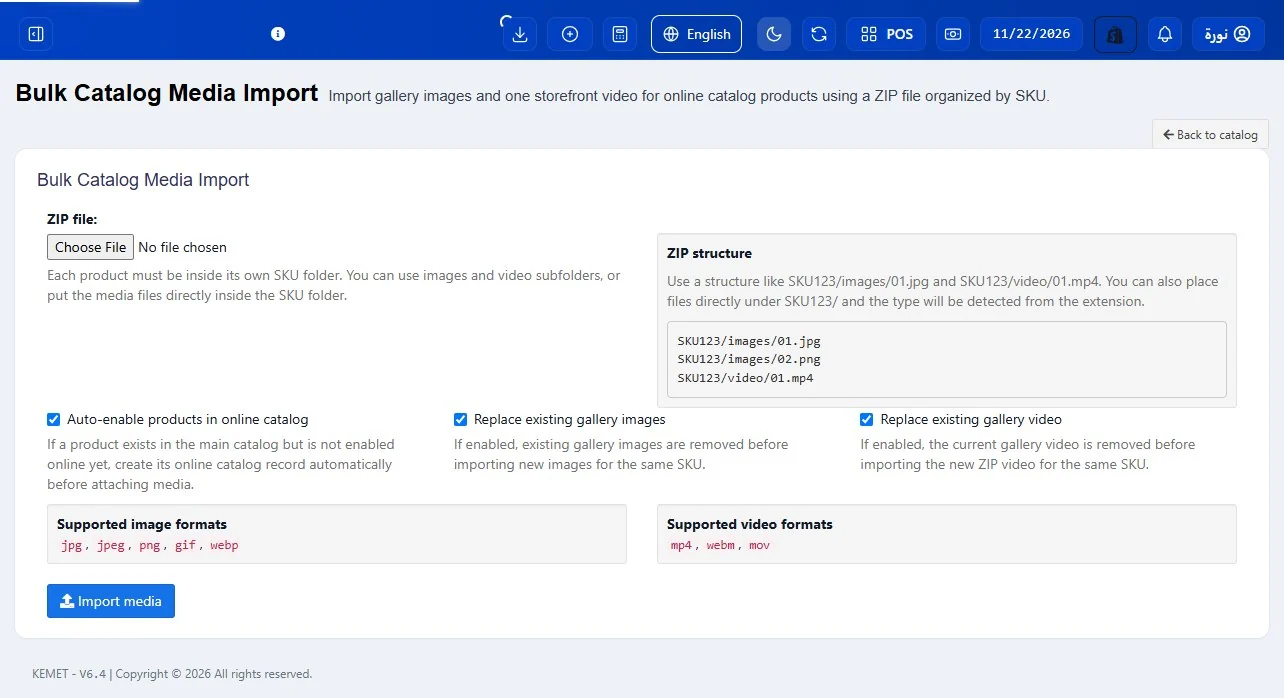
- Read the file matching instructions.
- Match each filename to the intended product code.
- Select the intended files and review duplicate links before importing.
- Open the modified items in the storefront and check the images.
Screen path in KEMET
/online-orders/catalog/media-importField reference
- Media package
- Choose the input format specified on the screen.
- Product match
- Inspect each identifier and the matched product or variant.
Worked example
Test a package with one valid training code and one unmatched filename.
Verify the matched item received the image and inspect the unmatched result.
Verify the result
- Open the modified items in the storefront and check the images.
Troubleshooting
The result does not match the intended record.
Check the original reference, name, and filters before repeating the operation.
The screen or action is missing.
Ask the company administrator to check the add-on, menu visibility, role permissions, and branch scope.
Requires the applicable Online Orders feature for the company and access for the signed-in user.