 KEMET
Create Journal Entry
Record a manual accounting entry in KEMET. Check the date, accounts and amounts, then save a draft or submit it for approval.
Steps
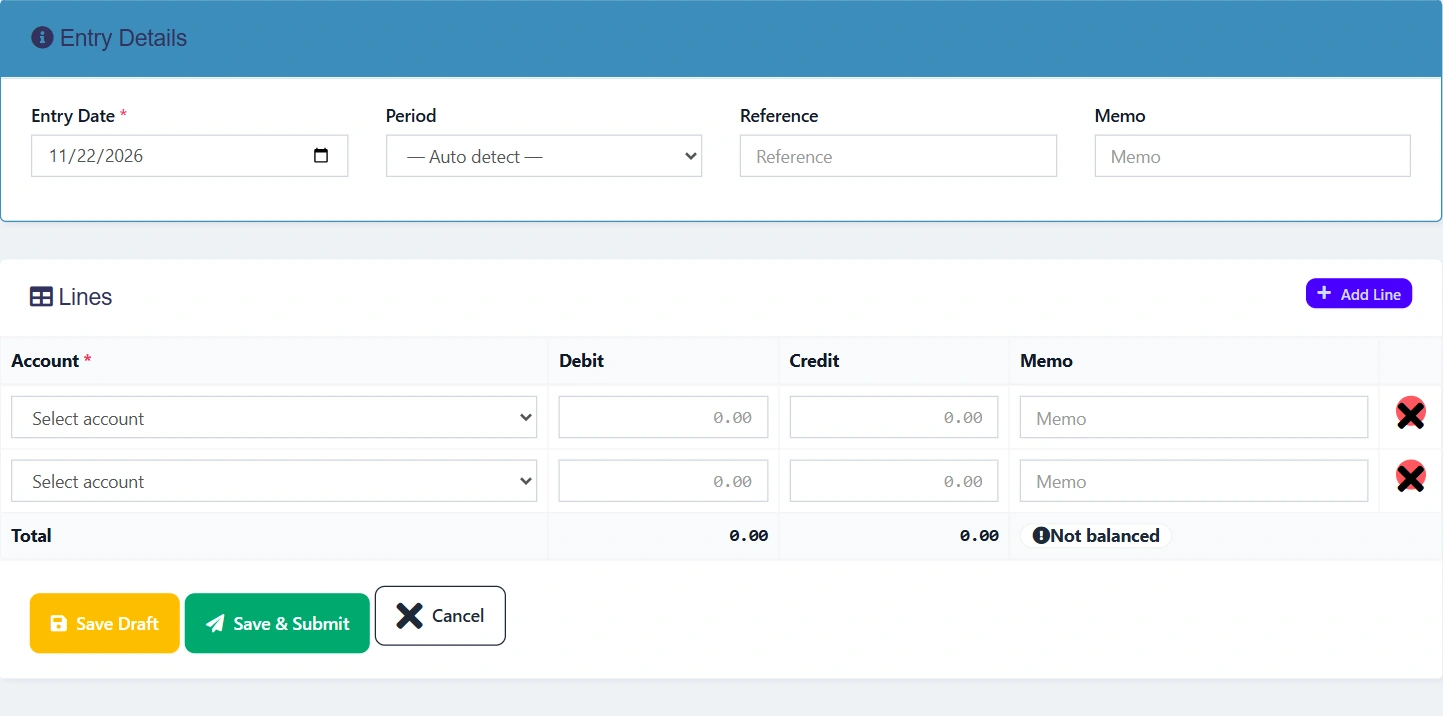
- Open Payment Accounts, then Create Journal Entry from the sidebar.
- In Entry Details, set the entry date, check the period, and add the reference and memo.
- In Lines, select an account and enter a debit or credit amount. Select Add Line if you need another row.
- Check that the totals under the table match and the balance indicator reads Balanced. Match the accounts, amounts and reference against the supporting document.
- Select Save Draft to review it later, or Save & Submit when it is ready for review.
Screen path in KEMET
/account/journal-entries/createField reference
- Entry Date
- Use the transaction date on the supporting document. This field is required.
- Period
- Leave Auto detect to find a period from the date. If you choose one, it must be open and include the entry date.
- Reference
- Optionally enter a document or bank statement reference you can use later. For example, BANK-014
- Memo
- Describe the entry in its details. You can also add a separate memo to each line.
- Account
- Choose the company account for the line. Check the number and name where names are similar.
- Debit / Credit
- Enter a positive amount in one of these fields per line. Use at least two lines and equal debit and credit totals.
Worked example
A demo company’s bank statement shows a charge of KWD 12.500 that the bank has already deducted. It has yet to be recorded in KEMET. Use the statement date, memo “Bank statement fee” and reference BANK-014.
| Account | Debit (KWD) | Credit (KWD) |
|---|---|---|
| Bank charges expense | 12.500 | — |
| Bank account | — | 12.500 |
| Total | 12.500 | 12.500 |
The entry is balanced. Saving a draft gives the entry a number and shows the Draft status in its details. Choose the equivalent accounts from your own chart of accounts.
From ChatGPT or Claude
Prepare a draft for bank charges already deducted on [document date]. Debit KWD 12.500 to Bank Charges Expense and credit KWD 12.500 to the Bank Account. Ask me if any account is ambiguous. Show both accounts, line amounts and totals before saving.
- Identify the date and company accounts, and check the preview before confirming.
- Approve saving once the preview matches your document. Open Journal Entries to verify the saved draft. If you explicitly requested submission, check that Approval Status shows Pending.
Confirmation in chat authorizes saving or submission for approval. An authorized user approves and posts the entry in KEMET. Use the KEMET form to set the dedicated Reference field or manually choose a period.
Verify the result
- Open the entry details and compare the entry number, date, reference, accounts and line amounts with the supporting document.
- Draft means the entry is saved and awaiting posting. After submission, Approval Status changes to Pending.
- An authorized reviewer chooses Approve & Post in the entry details. Confirm that the entry status shows Posted and Approval Status shows Approved.
Troubleshooting
The entry is unbalanced.
Check both totals against the document. Confirm that each line has an amount on only one side, with no missing or duplicate line amounts.
The entry date is outside the period or the period is closed.
Check the document date and choose an open period that includes it. Ask the accounting administrator about a closed period.
The account is missing from the list.
Confirm that you are in the correct company and that the account is open and accepts postings.
Approve & Post is missing.
Confirm the entry was submitted and that the reviewing user can approve journal entries.
If Create Journal Entry is missing, ask your administrator to check that Accounts is enabled and that your role can create manual entries. Viewing the saved details also requires journal entry view access.