 KEMET
List Purchases
Find a purchase invoice and check receipt status and supplier balance.
Steps
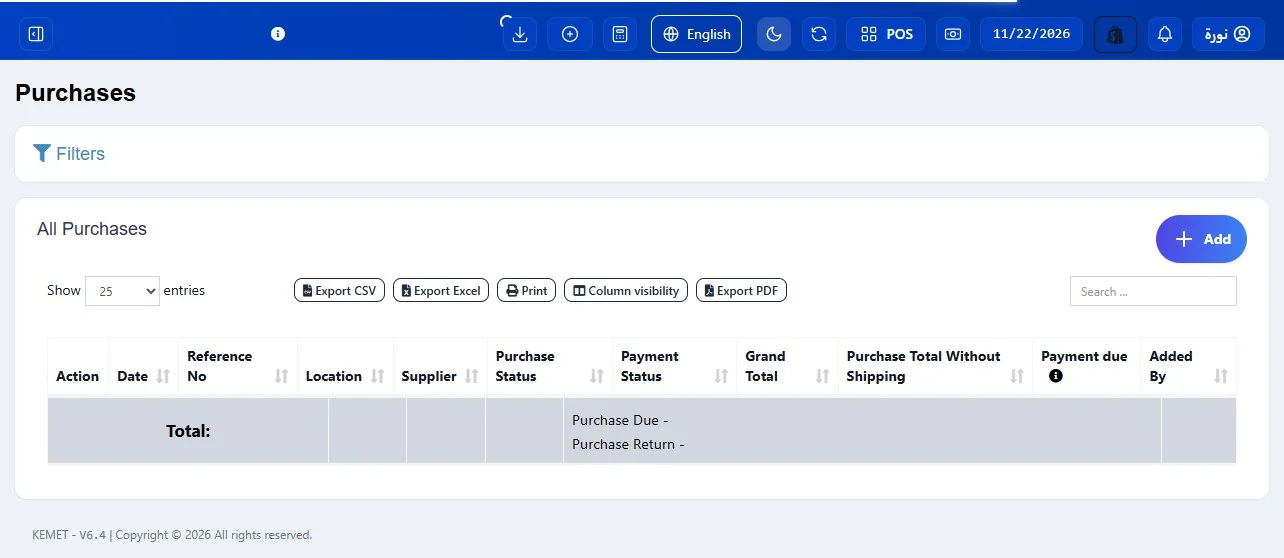
- Match the reference and branch to the supplier document.
- Open the invoice to review lines and recorded payments.
- For a payment actually made, use the allowed payment action against the balance.
- Verify the updated balance on the same invoice.
Screen path in KEMET
/purchasesField reference
- Reference number
- Finds the specific purchase when the supplier has multiple invoices.
- Purchase status
- Shows whether the purchase is received or still in another stage.
- Payment status
- Use with the recorded payments to verify the supplier’s balance.
Worked example
Open a demo supplier invoice of 50.000 KWD with 30.000 KWD recorded as paid. Check the expected balance of 20.000 KWD against its payment lines.
The payment history and due amount match the exact purchase and supplier.
From ChatGPT or Claude
Help me with List Purchases. Ask which branch, reference, or dates you need, and show the relevant data before any changes.
Related connector tools
- Purchases by product
purchase_purchase_report_by_product - Purchases by supplier
purchase_purchase_report_by_supplier - Purchase price trend
purchase_purchase_price_trend - Purchase invoice print link
purchase_print_purchase - Create a draft purchase
purchase_create_draft_purchase - Receive a draft purchase
purchase_convert_draft_purchase_to_received - Receive part of a purchase
purchase_receive_partial_purchase - Add items to a purchase invoice
purchase_add_product_to_purchase - Change a purchase supplier
purchase_update_purchase_supplier - Change the supplier invoice number
purchase_update_purchase_invoice_no - Change a purchase date
purchase_update_purchase_date - Change purchase notes
purchase_update_purchase_notes - Discount a purchase invoice
purchase_apply_purchase_discount - Change purchase shipping
purchase_update_purchase_shipping - Change purchase tax
purchase_update_purchase_tax - Change a purchase line cost
purchase_update_purchase_line_price - Change a purchase line quantity
purchase_update_purchase_line_quantity - Set lot and expiry dates
purchase_lot_expiry_purchase_update - Unpaid purchase invoices
purchase_due_purchases_report - Supplier purchase history
purchase_supplier_purchase_history - Purchase payment history
purchase_purchase_payment_history - What to reorder
purchase_reorder_suggestions - Purchases by branch
purchase_purchase_by_branch_report - Purchases by payment method
purchase_purchase_by_payment_method_report
Verify the result
- Check the status and branch before making another payment or attempting to receive stock.
Troubleshooting
The supplier invoice might be unmatched or duplicated.
Check supplier, reference and branch, then compare lines to the saved invoice before retrying.
The screen or action is missing.
Ask the company administrator to check the add-on, menu visibility, role permissions, and branch scope.
Screen access depends on company settings, the role, and its allowed branches.
Training in the KEMET Academy after signing in /academy/native/purchases