 KEMET
Add Purchase
Record a supplier invoice by receiving branch, variant, quantity and cost. Set receipt status separately from payment.
Steps
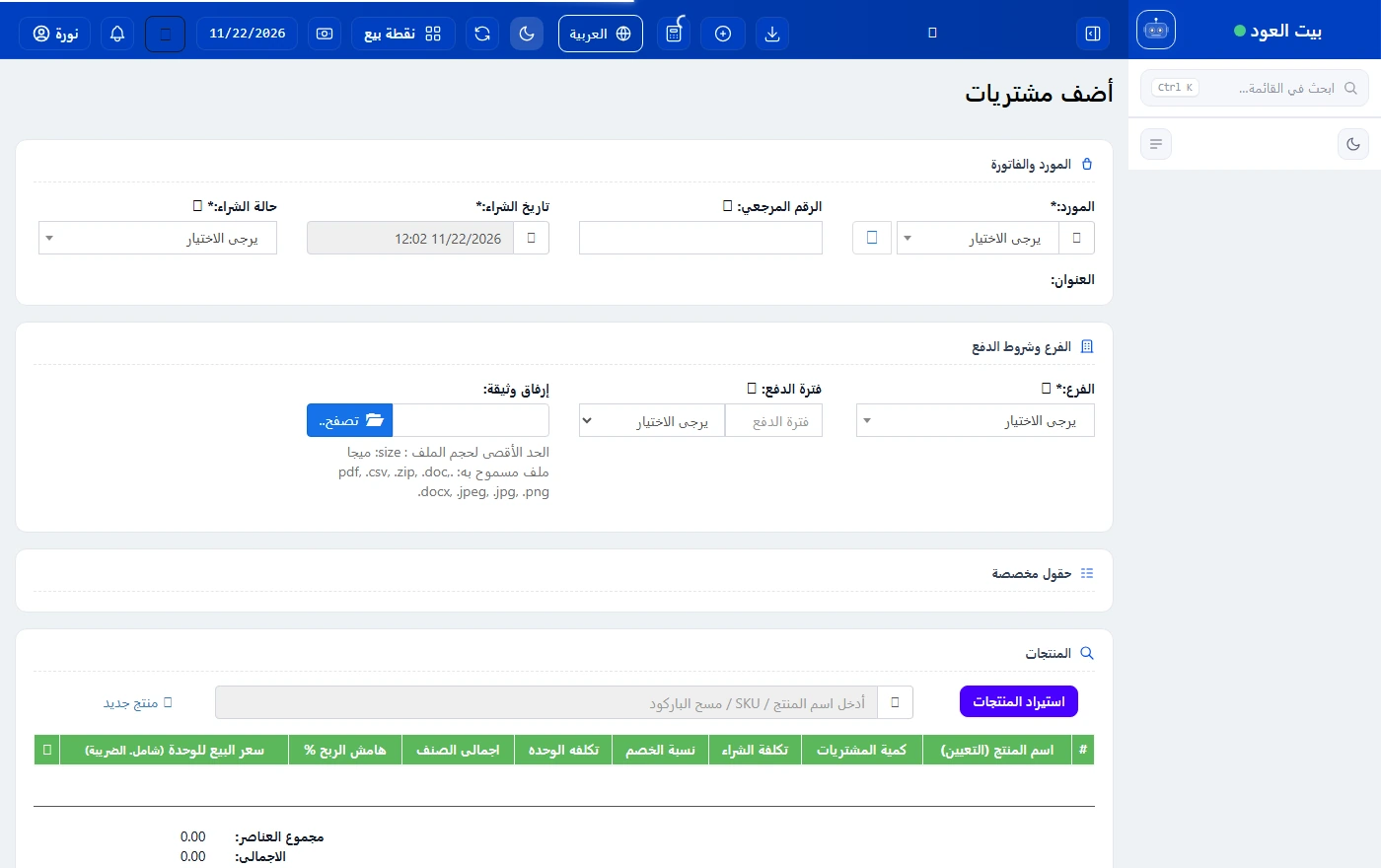
- Open Purchases.
- Choose Add Purchase.
- Select the Supplier.
- Check the Purchase Date.
- Enter the Reference No if you have one.
- Select Received if goods arrived and Purchase Status is visible.
- Choose the receiving Business Location.
- Enter the agreed payment term if applicable.
- Search for the first product by name or barcode.
- Select the exact variant.
- Enter its Purchase Quantity.
- Enter Unit Cost (Before Tax).
- Check the Line Total.
- Repeat for the remaining lines.
- Match Purchase Total to the invoice.
- In Add payment, enter the amount actually paid.
- Select the actual method when paid.
- Check Payment due.
- Choose Save.
Screen path in KEMET
/purchases/createField reference
- Supplier
- Required. Choose the matching contact. Check the address if names are similar. Gulf Trading
- Reference No
- Optional. Keep the reference used for reconciliation or leave it blank to generate one. SUP-104
- Purchase Date
- Required. Check the suggested date.
- Purchase Status
- Select Received for stock already received. Ordered and Pending do not increase available stock. If status selection is disabled, the form defaults to Received.
- Business Location
- Required. Choose where the goods were received before searching for items. Salmiya
- Pay Term
- Optional. Specify the agreed number of days or months. Enter the amount paid separately. 30 days
- Attach Document
- Optional. Use the form to attach a copy of the original invoice.
- Purchase Quantity
- Check both unit and variant. 6 bottles, 100 ml
- Unit Cost (Before Tax)
- Enter the cost of one unit before tax. Check the line discount and tax where applicable. KWD 10.900
- Purchase Total
- Compare the total after any discount, tax and shipping with the original invoice.
- Amount
- In Add payment, use 0 when nothing was paid. Enter the actual payment and method when some or all was paid.
Worked example
The Oud House has four 100 ml Rose Perfume bottles in Salmiya and two in Avenues. Salmiya receives six bottles at KWD 10.900 each, with no discount, tax or freight. The company already owes the supplier KWD 40.000.
| Payment | Paid now | Due on invoice | Total supplier balance |
|---|---|---|---|
| On account | KWD 0.000 | KWD 65.400 | KWD 105.400 |
| Part payment | KWD 20.000 | KWD 45.400 | KWD 85.400 |
Saving the received purchase takes Salmiya to ten bottles. Avenues stays at two in both cases. The balance due depends on the payment.
Receiving updates the branch stock. The actual payment amount determines whether the invoice is unpaid, partially paid or paid in full.
From ChatGPT or Claude
Prepare a received purchase from Gulf Trading for Salmiya. Six bottles of Rose Perfume 100 ml, code ROSE-100, at KWD 10.900 each. Entirely on credit. I paid nothing. Show the supplier, branch, variant, total, paid and due amounts before saving.
- For a photo, ask the chat assistant to extract each line. Clarify any unclear amount, quantity or variant.
- Match the supplier, branch and exact variant against KEMET.
- Review 6 × 10.900 = KWD 65.400, paid 0.000 and due 65.400. Ask for a new preview if anything differs.
- Approve the specific preview once correct. Keep the saved reference after confirmation succeeds.
The short invoice tool records a received purchase at confirmation with a generated reference. It handles full payment or full credit. Use the purchase form for separate tax, discount, shipping, document attachment, supplier reference or partial payment.
Verify the result
- Open List Purchases and find the reference.
- Match the supplier, branch, variant, quantity and total against the original.
- Check Purchase Status, Payment Status and the amount due.
- Check the variant in the receiving branch's Stock Report.
- Open the supplier Ledger for the invoice date and check the due amount.
Troubleshooting
I cannot find the item.
Choose the receiving branch first. Try the exact variant barcode and check that the product exists.
The total differs from the supplier invoice.
Check the unit cost, quantity, tax, discount, shipping and exchange rate.
Received items did not increase stock.
Open the existing record and verify the status, branch and variant. Update to Received with the required permission after checking delivery.
The supplier has not been paid.
Set the amount paid to 0. Check that Payment due equals the invoice total.
The screen or chat stopped while saving.
Search List Purchases by supplier, branch, date and total before trying again.
Enable Purchases and use a role with purchase.create. Viewing the saved purchase requires purchase viewing access.
Training in the KEMET Academy after signing in /academy/native/purchases