 KEMET
List Stock Transfers
Review items sent and received between branches.
Steps
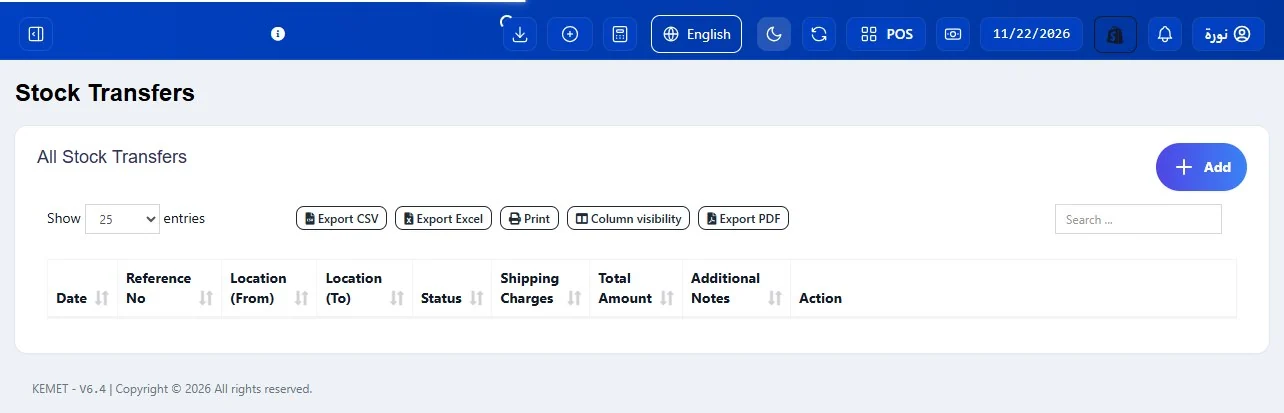
- Find the transfer by reference or branches.
- Open its lines and verify options and quantities.
- If receiving, confirm only after counting the actual arrival.
- Verify the transfer status and stock in both locations.
Screen path in KEMET
/stock-transfersField reference
- Origin and destination
- Show the two branches affected by the movement. Confirm the direction from the document.
- Transfer status
- Pending, in transit and completed describe progress toward receiving the goods.
- Line quantities
- Open the transfer to check the exact variants and units.
Worked example
Open TR-014 for three units from Downtown to Marina and compare the transfer state with the signed receipt.
A completed transfer can be traced in the branch stock history for both outlets.
Related connector tools
- Data: branch transfers
data_branch_transfers - Transfers waiting at a branch
incoming_branch_transfers - Receive a branch transfer
receive_branch_transfer
Verify the result
- Check the same reference, direction and quantity on the transfer details.
- If completed, verify the stock movement in both branches.
Troubleshooting
The result does not match the intended record.
Check the original reference, name, and filters before repeating the operation.
The screen or action is missing.
Ask the company administrator to check the add-on, menu visibility, role permissions, and branch scope.
Screen access depends on company settings, the role, and its allowed branches.