 KEMET
كل المبيعات
ابحث عن مبيعات الفرع وتحقق من الفاتورة والمدفوع والمتبقي.
خطوات التنفيذ
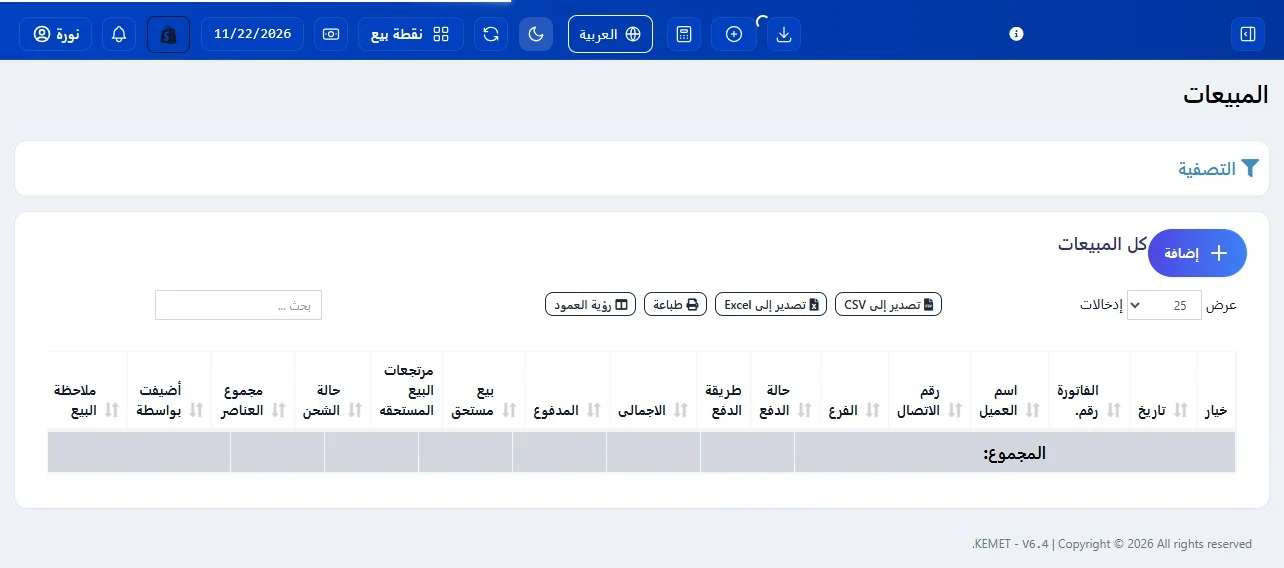
- حدد الفترة والفرع حسب العملية.
- ابحث برقم الفاتورة أو اسم العميل.
- افتح الفاتورة وطابق الحالة والمقاسات والإجمالي.
- راجع الدفعات في تفاصيل الفاتورة قبل إضافة أي دفعة جديدة.
مسار الشاشة داخل كيميت
/sellsشرح الحقول
- الفرع والفترة
- حصر القائمة في مبيعات النطاق الصحيح.
- حالة الفاتورة
- بتفرق بين المسودة أو سجل التجهيز وبين البيع المكتمل.
- المدفوع والمتبقي
- المبلغ المتسجل دفعه والباقي اللي الفاتورة لسه بتعرضه.
مثال عملي
افتح بيع تجربة بـ20.000 د.ك مسجل عليه دفع 12.000. راجع إن المطلوب 8.000 قبل تسجيل تحصيل جديد.
سجل الدفع يفسّر المدفوع وتقدر تحدد الفاتورة المطلوبة للمتبقي.
من ChatGPT أو Claude
ساعدني في «كل المبيعات». اسألني عن الفرع والمرجع أو الفترة اللي تحتاجها، وورّيني البيانات قبل أي تغيير.
- لعكس تحصيل نقدي عبر الفروع، راجع رقم الإيصال والفرع والمبلغ. أكّد فقط بعد رد نفس المبلغ للعميل بالفعل من سجل الكاش المفتوح في نفس الفرع.
أدوات الربط المرتبطة
- Sales summary
sales_summary - Sales by branch
sales_by_branch - Sales by product
sales_product_sales - Demand forecast
sales_demand_forecast - Sales setup
sell_sell_context - Sales invoice print link
sell_print_invoice - Customer sales summary
sell_customer_sales_summary - Sales by payment method
sell_sales_by_payment_method - Sales by cashier
sell_sales_by_cashier - Check stock before a sale
sell_check_stock_before_sell - Change an invoice customer
sell_update_invoice_customer - Change invoice notes
sell_update_invoice_notes - Discount a sales invoice
sell_apply_invoice_discount - Change invoice shipping
sell_update_invoice_shipping - Invoice link for the customer
sell_send_invoice_link - Add items to a sales invoice
sell_add_product_to_invoice - Compare branch sales
branch_branch_sales_comparison - Data: sales lines
data_sales_lines - Data: sales invoices
data_sales_invoices - Data: payments
data_payments
راجع النتيجة
- طابق رقم الفاتورة وسطور المقاسات ومراجع الدفع قبل تسجيل تحصيل تاني.
الأخطاء الشائعة
العملية ممكن تكون اتحفظت قبل ما تظهر النتيجة.
ابحث عن رقم الفاتورة أو العميل والفرع في نفس الفترة قبل ما تكرر الحفظ.
الشاشة أو الإجراء مش ظاهر.
اطلب من مسؤول الشركة يراجع الإضافة وإظهار القائمة وصلاحيات دورك والفروع المسموح لك بها.
تظهر الشاشة حسب إعدادات الشركة وصلاحيات حسابك وفروعه.
التدريب من أكاديمية كيميت بعد تسجيل الدخول /academy/native/sales