
सीधे सामग्री पर जाएँ
KEMETरिटेल
Features Point of sale Products, sizes and barcodes Stock and counts Branches, warehouses and pop-ups Purchases and suppliers Customers, loyalty and credit Online store and your domain Shopify integration WhatsApp invoices and messages Orders and delivery Pre-orders and tailoring Reports and analytics Accounts and expenses Staff, permissions and training Claude & ChatGPT All features
By business Groceries and food Fashion, perfume and beauty Electronics and devices Home, building and hardware Health, care and baby Gifts, books and hobbies Outdoor, garden and pets Cars and other stores All businesses
Pricing Guide Articles Contact About
Get started
العربية English हिन्दी اردو বাংলা Filipino

Stock and counts

Inventory and stock counts for retail

Every sale, purchase and transfer updates the balance at once. You know how many of each size are left in each branch, and you see an item before it runs out.

This page is in English because a translation for your language is not available yet.
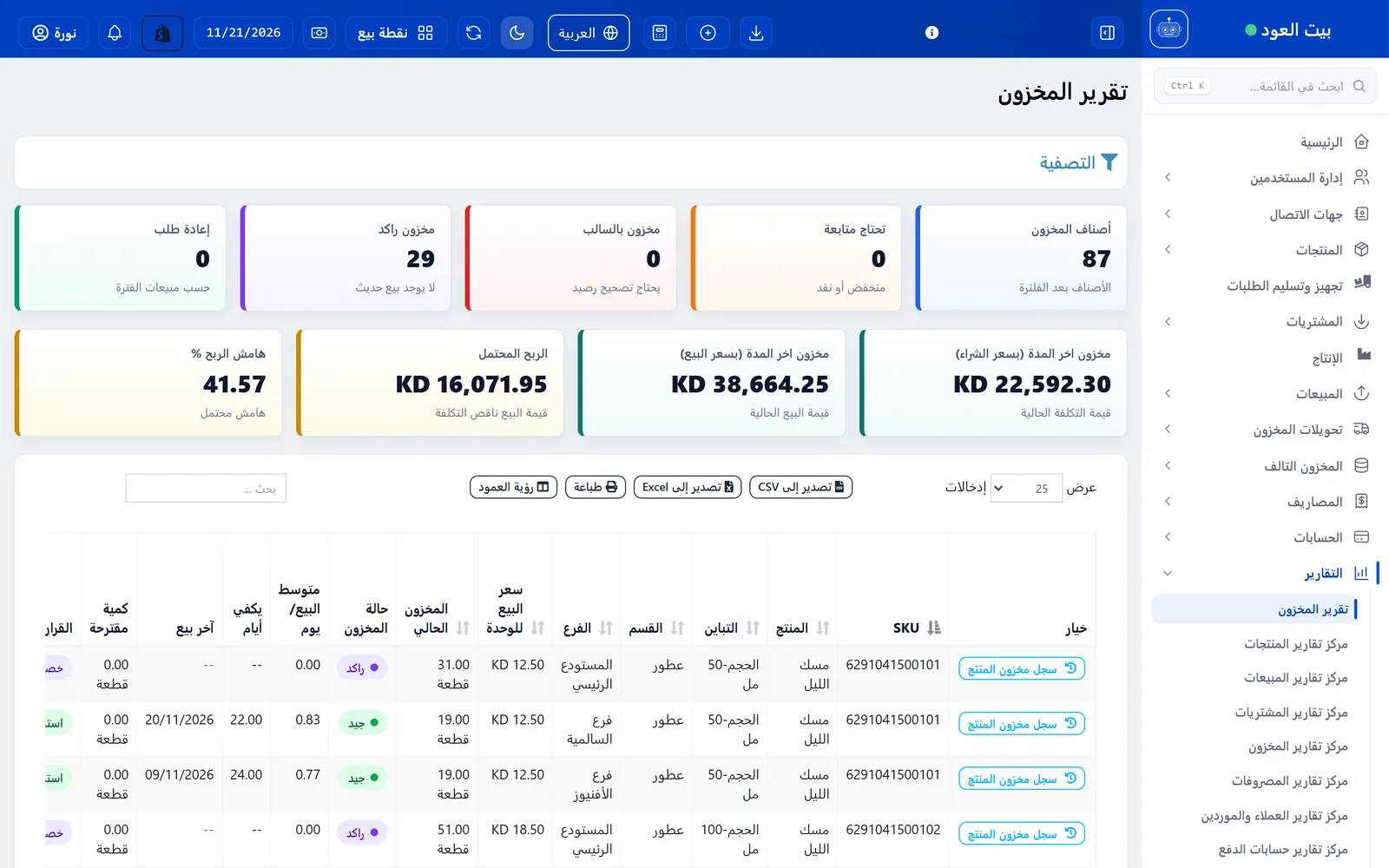
The stock report: stock value, dead stock, what to reorder, and every item's balance in every branch.

Stock and counts

Live stock per branch, counts, low-stock alerts and item history.

Live stock per branchOne screen shows an item's balance across all branches and warehouses.
Barcode stock countsFull or partial counts that compare what is on the shelf with the system and record the difference after your approval.
Alerts before it runs outA minimum per item; items close to running out show on the owner's dashboard.
Every item's historyWhere it came from, where it sold, when it moved between branches and who adjusted it.
Expiry dates and lotsFollow items close to expiry and sell the oldest first.
Slow movers and turnoverA report of fast, slow and dead stock so you decide what to buy and what to discount.
Damage and adjustmentsRecord damaged or missing stock with a clear reason; accounts adjust too.
Item locationRack, row and position inside the warehouse to find a piece quickly.

Real screens from the system with a demo shop's data

Inside the system

The stock report: stock value, dead stock, what to reorder, and every item's balance in every branch.

Stock and counts

How it works

  1. Goods arrive with a purchase invoice or a transfer.
  2. Every sale reduces the balance at the same moment.
  3. Alerts tell you before an item runs out.
  4. Regular counts match the shelf with the system.

Common questions

Common questions

Can I count a branch while it keeps selling?

Yes. Count a section or a branch; KEMET applies the difference against the balance at approval time.

Does it follow expiry dates?

Yes, for the items where you turn on expiry dates, with a report of what expires soon.

How do I find slow movers?

The stock turnover report ranks items from fastest to slowest and shows the value of dead stock.

Ready to see KEMET in your shop?

Message us on WhatsApp or start signing up, and we will set up your account and move your items with you.

WhatsApp